



































Platform > Execution Layer
Turn data + AI outputs into action.
The Rayven Execution Layer closes the loop between data and action; automating workflows, deploying AI models, firing alerts + triggering system updates based on what's happening right now. Rayven MCP extends this further, giving AI governed, real-time access to your contextualised operational data.
No-code automationAI model deploymentReal-time alertingCross-system triggers


EXECUTION LAYER - LAYER 03 / 05
Automate prcoesses.
Eliminate manual effort.
Act in real-time.
Data without action is just observation.
The Execution Layer is where the Rayven Platform turns insights into outcomes - automatically triggering workflows, deploying AI models, notifying the right people + updating connected systems the moment things change.
Whether you need to trigger alerts, automate a response, run a predictive model on incoming data, or trigger a workflow when values drop below thresholds; the Execution Layer handles it without custom code or manual intervention.
It also includes Rayven MCP - giving AI assistants like Claude, ChatGPT + Gemini governed access to your live operational data.
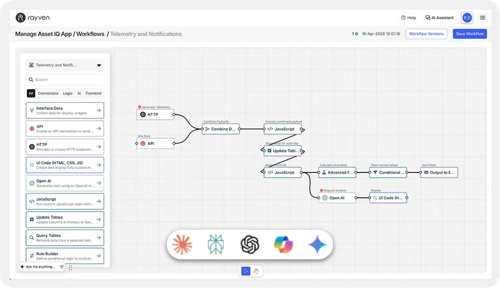
From condition to action instantly
Define triggers on any data condition - threshold breach, pattern match, schedule - and fire automated actions across any connected system in real-time.
AI that actually does something
Deploy, run + operationalise AI models inside your workflows and business, so predictions and recommendations automatically trigger actions, not just reports.
Built for real-world complexity
Multi-step workflows, conditional branches, approval gates, retry logic + cross-system orchestration - all without writing a single line of code.
EXECUTION LAYER CAPABILITIES
Explore all 6 Execution Layer capabilities.
Workflows + Triggers
Build + orchestrate multi-step workflows triggered by data events, schedules, external webhooks, or manual actions - the sequencing backbone of every execution step.
Learn more →Control + Automation
Write commands to connected devices, APIs + systems the moment conditions are met. Close the loop from data insight to real-world action without manual intervention.
Learn more →Predictive AI + Machine Learning
Deploy trained ML models directly into live workflows to score, classify + forecast from incoming data; enabling prediction-driven automation that act ahead of time.
Learn more →Gen AI + AI Agents
Use LLMs for document processing, structured extraction + agent-style automation within workflow logic - no separate orchestration layer or external AI infrastructure required.
Learn more →Approvals + Exceptions
Route decisions to the right people, enforce escalation paths + handle exceptions; so automation pauses for human judgment when it matters and continues automatically when it doesn't.
Learn more →Rayven MCP
Give AI assistants like Claude, ChatGPT + Gemini governed access to your live operational data - through a five-stage pipeline that ingests, stores, contextualises + exposes it via a typed MCP server.
Learn more →PROBLEMS THE EXECUTION LAYER SOLVES
Execution challenges we solve every day.
We breakdown the same frustrating barriers that come up time and again, including:
AI has no access to your data
Claude, ChatGPT + Gemini can't query your live systems. Without a governed data layer, every AI answer is a guess or requires someone to manually pull + paste data first.
AI insights go unacted
Models predict. Dashboards display. Nothing actually triggers a response. The gap between insight and action stays manual.
Inconsistent processes
Without enforced logic, the same situation produces different outcomes depending on who handles it and when.
No exception handling
Automation breaks at the edges and no one knows. There's no fallback, no retry, no alert - just a process that silently stopped.
Approvals that halt workflows
A decision needs a person. That person is unavailable. The process waits with no escalation, no deadline + no way forward.
Fragmented execution tools
Actions, alerts, approvals + AI outputs all live in different systems with no shared context and no single place to see what happened.
FAQs
Rayven Execution Layer FAQs.
The questions CTOs, IT leaders + transformation directors ask most often about our Execution Layer.
What is the Rayven Execution Layer?
The Execution Layer is Layer 3 of the 5-layer Rayven Platform stack. It is the action engine of the platform - responsible for automating workflows, deploying and running AI models, firing alerts, evaluating business rules, processing complex events, and triggering updates to connected systems based on real-time data conditions. Everything the Data Layer produces becomes actionable through the Execution Layer.
What types of automation can be built using the Execution Layer?
The Execution Layer supports a wide range of automation types: alert-driven notifications (send a message when a value exceeds a threshold), workflow automation (multi-step processes with branches and approvals), AI-driven actions (run a model and act on its output), scheduled tasks (run something at a defined time), event-based triggers (respond to patterns across multiple data streams), and external system updates (write back to ERP, CMMS, cloud platforms, or any API-connected system).
How does Rayven's alert engine work, and what notification channels are supported?
The alert engine evaluates conditions against incoming data in real-time. Conditions can be based on threshold breaches, rate-of-change, statistical anomalies, or custom expressions. When a condition is met, alerts are delivered via email, SMS, Microsoft Teams, Slack, PagerDuty, webhook, or in-platform notification - with configurable escalation, acknowledgement tracking, and snooze logic.
Can Rayven deploy and run AI and machine learning models?
Yes. Rayven allows you to deploy machine learning models and AI functions directly into the platform's workflow environment. Models can be called as a step within an automation - receiving data inputs and producing outputs that drive subsequent actions. Rayven supports models built externally (imported via API or file) as well as those trained within the platform. Model outputs are logged, versioned, and auditable.
What is Rayven MCP and how does it work within the Execution Layer?
Rayven MCP (Model Context Protocol) is an Execution Layer capability that gives AI assistants - including Claude, ChatGPT + Gemini - governed, real-time access to your contextualised operational data. Rather than answering questions based on generic training data, AI assistants connected via Rayven MCP can query your live platform data, retrieve current asset states, and reason over what is actually happening in your business right now. Access is fully governed: you define what data each AI assistant can see, under what conditions, and with full audit logging of every query made.
How does Rayven MCP differ from the Gen AI + AI Agents capability?
The Gen AI + AI Agents capability is about deploying AI as an actor - building agents that autonomously execute tasks, orchestrate multi-step workflows, and take actions within your operations. Rayven MCP is about giving external AI assistants (the tools your people already use) governed read access to your operational context. Gen AI agents operate inside Rayven; MCP gives external AI a governed window into Rayven. The two are complementary - you might use MCP to let ChatGPT answer "what's the current OEE on Line 3?" while a Gen AI agent automatically responds when OEE drops below threshold.
How are workflows triggered in the Execution Layer?
Workflows in the Execution Layer can be triggered in four ways: by a data condition (a value or pattern in the Data Layer), by an external event (a webhook or API call from an external system), on a schedule (a defined time or interval), or manually (by an authorised user via the platform or API). Multiple trigger types can be combined for complex orchestration scenarios.
Does Rayven support complex event processing across multiple data streams?
Yes. The Execution Layer includes a complex event processing (CEP) engine that can detect patterns across multiple data streams simultaneously - for example, identifying that three separate sensor readings have moved in a correlated way over a 10-minute window. This enables use cases like predictive maintenance triggering, safety interlock automation, and multi-condition alert suppression.
Can automated workflows integrate with external third-party systems?
Yes. Workflow actions can write to any system connected to the Rayven Integration Layer - including ERP systems, CMMS platforms, cloud APIs, databases, messaging services, and IoT actuators. Rayven also exposes a webhook action type so workflows can trigger any HTTP-capable external service. All outbound actions are logged and can be retried or escalated on failure.
How do we manage, version, and audit automation rules?
All rules, workflows, and automation logic in the Execution Layer are managed centrally in the Rayven admin interface. Changes are versioned with author, timestamp, and description. Activation, deactivation, and modification of any automation creates an audit log entry. Teams can maintain staging and production environments with controlled promotion of changes.
What happens if an automated action fails or a connected system is unavailable?
Execution Layer workflows include configurable failure handling: retry with backoff, alternative action paths, escalation alerts, and dead-letter queuing for failed actions pending manual review. If a connected system is unavailable, the workflow can pause and retry, alert a human for intervention, or take a fallback action - depending on the criticality of the process.
How does the Execution Layer relate to the Data Layer below and the Presentation Layer above?
The Execution Layer sits between the Data Layer (Layer 2) and the Presentation Layer (Layer 4). It consumes real-time and stored data from the Data Layer to drive automated actions, and produces outputs - updated records, alerts, model results, system writes - that are reflected in dashboards and reports in the Presentation Layer. It is also the layer that pushes data back out to connected external systems via the Integration Layer, closing the operational loop.
Stop watching it happen. Start making it happen.
Automate processes, eliminate manual efforts + go from data condition to action in real-time.
Join the Shift
Discover the easy way to do something new.
Book a free 30 minute assessment with our team and we'll scope your project, needs + what a solution might look like.